
Imagine you arrive at the workplace and discover your system is not working. You can’t access files, emails have stopped working, and customers are not able to reach you. A cyber attack, hardware problem, or accidental deletion can stop your business in minutes. For small and medium-sized enterprises, even a few hours of system outage can result in loss of revenue, reduced productivity, and annoyed customers. That’s why having a good cloud disaster recovery plan is essential.
Cloud disaster recovery helps businesses to quickly restore their critical systems and important data after an unexpected incident. Modern Cloud disaster recovery services help SMEs to get backup faster, reduce downtime, and keep running their business smoothly without the need of very expensive backup infrastructure.
So, let’s explore how cloud-based disaster recovery works and why it’s the smartest investment for SMEs.
What Does Disaster Recovery Mean for SMEs?
When the average person thinks of “disaster recovery,” they think of big disasters like fires or floods. In reality, businesses today are likely to be impacted by
-Ransomware
-Server and hardware crashes
-Human error like accidental deletions
-Corrupted software
-Power outages
All of these can halt normal operations, keep staff from working, and erode customer confidence. Many small and medium businesses do not have the IT support to help them recover. That is why disaster recovery is so much more than file backups, it’s about continuing operations with as little disruption as possible.
How Cloud-Based Disaster Recovery Works?
Modern cloud disaster recovery uses secure cloud infrastructure to keep your systems and business data ready for recovery.
Here’s how it works:
Continuous Data Replication
A secure cloud server keeps replicated versions of important documents, applications, and data.
Automated Backups
Necessary documents, databases, emails, and business applications can be programmed to create backups at defined intervals.
Fast Failover
If an on-premises system is compromised or malfunctions, employees will be able to access the cloud to resume work.
Quick Recovery
When your systems are restored to normal, there will be a very short downtime to transfer data and applications back.
Replication, backup, and failover create a more robust system of cloud disaster recovery service than the traditional systems of backup and recovery.
How Cloud Disaster Recovery Saves Time?
One of the largest expenses when dealing with an IT outage is time. Recovering the traditional way means having to replace the hardware, set the operating system back up from scratch, restore the backup files, and reconfigure the applications. Depending on the scenario, this can take several hours or even days.
With cloud disaster recovery:
-Systems can be restored faster.
-Employees get application access faster.
-There is less of an impact on a business’s day-to-day operations.
-IT teams spend less time doing recovery tasks.
The faster the recovery is, the less time a business has to deal with an outage and the more time it has to serve customers.
How It Saves Money?
While SMEs consider disaster recovery as something costly, the expense of the downtime is even greater.
Cloud disaster recovery cuts down costs in various ways:
Downtime Reduction : Each hour when the business is out of action causes sales loss, opportunity loss, and loss of employee productivity. Fast recovery reduces such financial damage.
Exclusion of the Costly Backup Infrastructure: Conventional disaster recovery system required companies to have duplicate servers or another data center. Cloud disaster recovery eliminates the necessity by storing replicated systems in the cloud.
Less IT Expenses : Automated backup and restoration make IT department spend less time on handling the emergency, thus freeing up for more useful business activities.
Protection of Business Critical Information :Fast recovery saves valuable files and prevents businesses from costly data loss in case of cyberattack.
How Cloud Disaster Recovery Reduces Stress?
The pressure can be very high for both employers and employees when technology fails.
Having a good disaster recovery plan means that a company can rest easy knowing that it has a disaster recovery plan in place.
This means:
-Awareness that you are safe as far as your data is concerned.
-Office employees can remain calm during emergencies.
-Increased security against unexpected events.
-Continuity of operation during technology malfunction
Real-World Situations Where Cloud Disaster Recovery Helps
Malicious Email
A damaging email encrypts company documents so that employees cannot gain access to important files. Cloud backup allows for quick restoration of clean versions of an organization’s entire system, which minimizes downtime.
Server Crash
An old server malfunctioned. Instead of waiting for new, the old one can be replaced by cloud-based recovery systems.
Human Error
One of the employees accidentally erases essential documents belonging to clients. The office has backup information in the cloud that allows the files to be restored quickly.
Premises Failure
A power failure or a problem with the internet access impedes the use of the systems on the premises. The employees continue with their work using cloud-based technologies.
These situations show the importance of disaster recovery for businesses, as it is needed not only during big catastrophes.
Is Cloud Disaster Recovery Right for Every SME?
The cloud-based disaster recovery approach will be of great help to firms which:
-Always use digital procedures.
-Advocate for the practice of telecommuting.
-Work with Microsoft 365 or cloud software applications.
-Must adhere to compliance or security laws.
-They keep critical info about customers or finances.
-They cannot suffer a long downtime.
If losing access to your services even for a couple of hours will negatively influence your business, investing in these services is a wise decision.
Why Choose Venom IT?
Venom IT allows small and medium businesses to set up a robust IT infrastructure.
Our services include:
– Disaster recovery strategy
– Cloud backup and cloning
– Business continuity strategy
– Disaster recovery testing
– Constant support
– Specialized solutions for other organizations
Conclusion
IT disruptions are happening more often, and this can have serious consequences for a business. Investing in cloud disaster recovery allows SMEs to speed up recovery, minimize the time of system downtime, protect the integrity of important data, and avoid the costs associated with long-lasting outages.
Good cloud disaster recovery solutions are more than just a backup; they help your business operate with confidence even when something unexpected happens.
Ready to Protect Your Business?
Don’t wait until an outage exposes weaknesses in your IT infrastructure. Contact Venom IT today for a disaster recovery readiness review. Our experts will assess your current environment and recommend a cloud disaster recovery solution that keeps your business secure, resilient, and ready for whatever comes next.
In 2026, businesses are changing the way they communicate with people. This is not just to follow the latest technology but to stay ahead of the competition, save money, and work in a more efficient way. So, one of the major changes happening now is moving from traditional phone systems to Cloud phone systems for communication.
If you’re still relying on old desk phones, this is the right time to consider switching to cloud phone systems for your business. Let’s break down why this change is happening, why it is important for your business, and how you can make the move in a smooth way.
The State of Business Phone Systems in 2026
The traditional phone system is slowly becoming outdated, and in many places, it’s already being phased out.
PSTN Switch-Off is Happening
Around the globe, telecom providers are shutting down the Public Switched Telephone Network (PSTN). This means old landline phones will no longer be supported in the future. So, businesses that don’t adapt will face problems and forced upgrades.
Rising Maintenance Costs
Legacy systems appear cost-effective at the beginning, but over time, they start draining your budget through a series of hidden expenses like
– Expensive hardware repairs
– On-site maintenance
– Limited scalability
– Over time, maintaining these old systems became more costly than upgrading them.
Limited Flexibility
Traditional systems were built for a different era. Those were the days when work used to happen in a single location and there was nothing like remote work. These systems struggle to support today’s dynamic work environment, multi-location teams, and mobile-first communication. Nowadays, businesses rely on flexibility and real-time connectivity, due to which these traditional systems limit productivity.
Benefits of Cloud Phone Systems for Business
Switching to cloud phone systems does not mean just changing the hardware; it also has a big advantage on overall business communication.
1. Work from Anywhere: With cloud phone systems, your team can take calls from PCs, laptops, and mobile phones by working remotely. This is a great solution for companies that work hybrid or remotely so they have flexibility and easy communication.
2. Cost Savings: There is no need for expensive hardware or ongoing maintenance. You only pay for what you use. This allows lower setup costs and reduced dependency on IT resources. Hence, your business can save money in the long run.
3. Easily Adaptable: If you are thinking of hiring new employees, cloud telephony will make it easy to scale. You can add users immediately, without setting up any new infrastructure.
4. Better Security: Cloud providers make sure your communication is safe and secured. Hence, cloud phone systems for business come with features such as data encryption, system updates, and backup systems.
5. Next-Gen Features: Cloud phone systems have the latest features like call recording, voicemail to email, and analytics tools. These features help to improve customer experience and also amplify the performance.
Types and Models of Cloud Phone Systems
It’s important to understand the various types of cloud phone systems before beginning your VoIP conversion in 2026.
1. VoIP (Voice over Internet Protocol) – Cloud calling is based on VoIP. In this case, calls are made via the internet rather than phone lines. This type is inexpensive and incredibly simple to set up.
2. Cloud PBX (Private Branch Exchange) – Cloud PBX, or Virtual PBX, is an internet-based telephone system that manages call routing and voicemails through remote servers. Here physical hardware is not required. It is best for SMEs.
3. UCaaS (Unified Communication as a Service) – This is a cloud-based paradigm powered by AI platforms that combines messaging, video conferencing, voice calls, and collaboration capabilities. For expanding and hybrid teams, this works best. Dialpad, Zoom, and Microsoft Teams are popular UCaaS services.
Migrations Considerations and Best Practices
Moving to cloud phone systems is easy if it’s done in the right way. First, analyze your current system. How many users do you have? What the call frequency is and the challenges faced, all these things must be noted. Cloud phone systems work on the internet, so it’s essential to check the internet quality. Make sure you have a stable and high-speed internet connection and even a backup connection in case of a power cut.
Training your team is very important. Giving tutorials and teaching how to use the new features can help teams to learn quickly. Don’t switch all at once; plan a phased migration process. Begin with a small team, test the performance of the cloud phone system, and then gradually expand throughout the organization so that everything runs smoothly.
Security is also an important factor. Choose an IT provider that offers strong data protection and follows protocols to keep your business communication secured and safe.
Pitfalls to Watch for With Poor Service Providers
Not all service providers offer the same level of quality. Choosing a wrong partner can lead to frustration and business problems.
1. Unclear Audio in Phone Systems: Low-quality service providers may result in call drops, degraded sound quality, and echo problems. This might affect your customer experience
2. Inadequate Support: If something goes wrong, we need quick help. So, those service providers with slow response times or those who don’t have local support can leave your business stuck during an IT disaster.
3. Poor Security: If the security is weak, it can lead to data breaches, which can put your business’s confidential information at risk. So, ensure your provider follows strong security practices.
4. Hidden Expenses: Some service providers offer low costs at the beginning but later charge extra for basic essential features and upgrades. So, you need to review the complete pricing structure before purchase.
Implementation Roadmap: How to Get Started
If we follow a clear and structured plan, then it becomes easy to switch to a cloud phone system. Switching to a cloud phone system for business can be simple when you follow a clear and structured plan.
Step 1: Identify your Requirements
First of all, understand what your business requirements are. Then consider how many employees in your organization will use this cloud phone system. This helps in understanding the setup requirement. You need to set up a budget and choose a solution that best suits your business.
Step 2: Choose the right service provider.
Selecting the right service provider is an important step in your cloud phone system journey. Check customer reviews and feedback about the provider’s reputation and their real-world performance. Also, choose a provider that offers scalable solutions and responsive support. So, you can get quick assistance whenever needed.
Step 3: Test the System
Before fully implementing the solution, it’s important to test how it performs in a real work environment. Run a pilot program with a small group of users to understand how the system works. In this phase, you can check the call quality, reliability, and all features. This step helps to identify and fix issues early.
Step 4: Migrate Gradually
Instead of switching everything at once, make the migration process in small phases. Move teams’ step by step, starting with smaller groups and then gradually expanding across the organization. This helps to minimize disruption, smoother adoption and better transition process.
Step 5: Train & Optimize
Once the system is in place, focus on training your employees, so they can use it effectively. Provide guidance on important features, monitor how the system is being used, optimize the settings to improve performance and overall communication experience.
Conclusion
2026 is not just another year, but it’s a turning point for business communication. With the PSTN phase-out, rising costs of legacy systems, and the need for flexibility, moving to the cloud is essential.
A cloud business phone system gives you freedom to work anywhere, lower operational costs, efficient customer communication, and revolutionary technology. If your business is still relying on traditional phone systems, now it’s time to act wisely. A well-planned VoIP migration in 2026 can transform how your team connects, communicates, and grows.
At the end of the day, communication is the backbone of your business, and upgrading it could be the smartest decision you can make this year with Venom IT’s Cloud Phone System.
Just imagine you are an accountant working late into the evening during tax season. You have dozens of client files open, deadlines to meet, and suddenly your system freezes. Then to add stress to the situation a virus alert pops up on your screen. This is a nightmare scenario that no accountant or finance company wants to deal with . When sensitive client data is on the line, even a small security breach can cause serious financial loss and reputational damage. Not to mention the disruption to your team scrambling to address the problem.
To mitigate against these kinds of instances Hosted Desktop services come into play, providing reliable, secure, and 24/7 available access to your work environment, from anywhere, at any time.
What is a Hosted Desktop?
Think of a hosted desktop as your entire office computer, but instead of being physically in your office, it lives and runs on the internet (in the cloud). Instead of relying on one device, your desktop files, applications, and software are all stored in a secure UK data center. Log in from any internet-enabled device and work as if you are at your office desk.
For modern accountants and financial firms, this offers a major benefit. There’s certainly no need to carry confidential data on a USB stick, or risk losing files if your laptop fails. Everything is securely stored in the data center and managed by IT specialists.
Why Security Matters for Accountants
Accountants and finance firms deal with a high volume of highly confidential information. From tax returns to payroll data, your reputation depends on keeping that information secure. A single breach could cost far more than the price of any reputable IT service.
That is why hosted desktop services for Accountants and financial firms in Manchester place such a strong emphasis on security. Venom IT adds several layers of protection, so your client data is safe from any risks at each stage. Let’s look at what this includes.
Key Security Features with Venom IT Hosted Desktop Solutions
Our Hosted Desktop and Citrix services offer core security attributes for accountants and finance enterprises, which include the following:
- Sentinel One Endpoint Protection – This provides AI-driven endpoint protection that immediately detects and stops suspicious system actions, preventing malware, ransomware, and other virus attacks before they cause harm to the system.
- Duo Two-Factor Authentication (2FA) – This feature requires users to complete an extra login step, similar to approving access from their phones, which would allow only authorized individuals to access your hosted desktop.
- Data Centers in the UK- All your data is stored within the UK data centers, keeping your business aligned with GDPR and fiscal compliance norms.
Hosted desktops for Accountants and Finance firms make hybrid-working much simpler and safer in numerous ways, such as:
- Work from anywhere – You can access your desktop securely at home, at the office, or indeed while hanging out.
- No need to invest in new hardware systems – Your desktop is in the cloud, so you do not need to keep buying new computers and laptops.
- Scheduled backups – If your device crashes, your work will remain safe as before.
- Fast and reliable performance – Venom IT guarantees high availability, allowing minimal downtime for your team.
- Scalability – Add new users or increase the storage easily as your enterprise grows.
Why does Venom IT’s Hosted Desktop Services stand out from others in the Manchester IT Market?
Due to the integration of Sentinel One’s advanced threat protection and Duo 2-Factor Authentication, Venom IT provides a strong shield to your business against Cyber attacks. We provide 24/7 support whenever you need help. With ISO 27001, 27017, and 27018, as well as other Cyber Essentials certifications, Venom IT meets industry standards. Also, our transparent SLAs clearly guarantee uptime and efficient performance.
What to do next?
In the fast-paced world of finance, uninterrupted operations, strong data security, and seamless regulatory compliance are essential for accountants and financial professionals to carry out their tasks smoothly. With advanced AI tools, Venom IT ensures your firm is not only productive but also protected against cyberattacks.
For a smarter way of working, with improved digitized technological tools, our Venom IT’s Hosted Desktop services would be the best solution for your firm to reach new business heights.
To find out more about how we can help your finance team, simply get in touch with an expert here: https://www.venomit.com/contact-us/
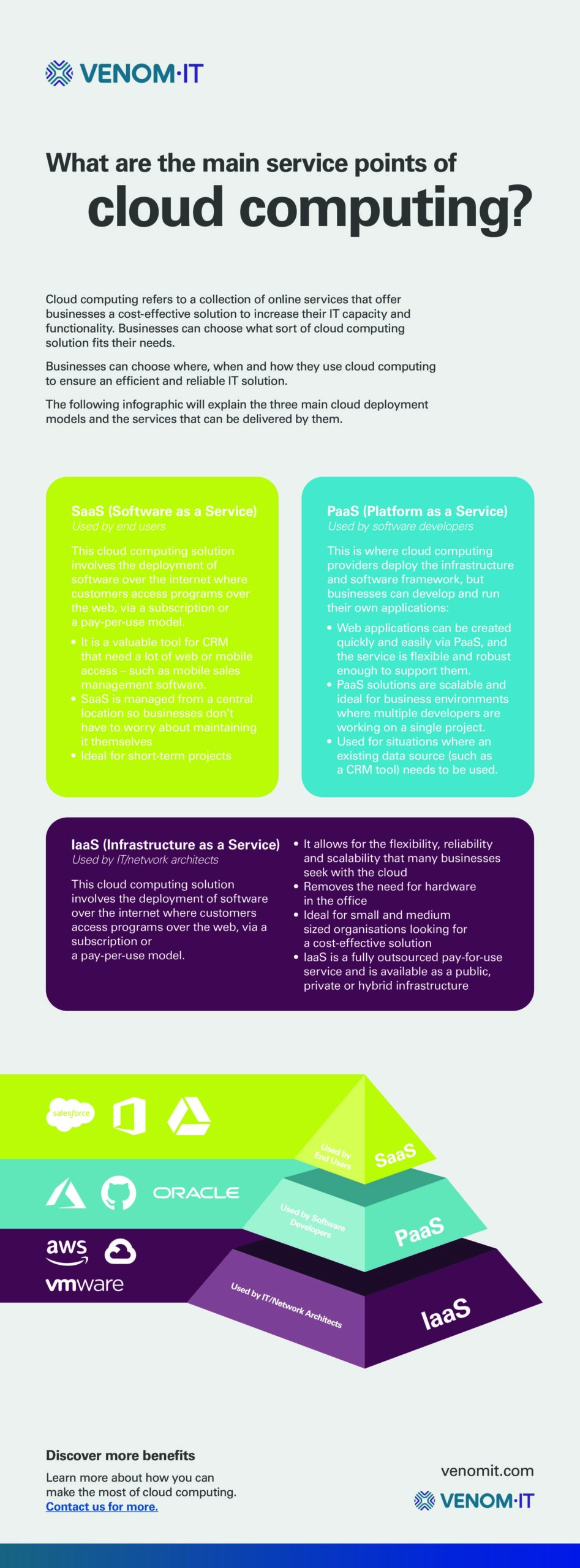
Cloud computing refers to a collection of online services that offer businesses a cost-effective solution to increase their IT capacity and functionality. Businesses can choose what sort of cloud computing solution fits their needs. They can choose where, when and how they use cloud computing to ensure an efficient and reliable IT solution. (more…)

So, that’s our full explanation of digital transformation – all in a single infographic for you. Moreover, be sure to click on it and download the entire graphic so you have it to hand (it’s a PDF). As you probably know already, we go the extra mile for you here at Venom IT, too. In fact, we’ll give all this information to you in words as well.
Read on to see a written explanation of a digital transformation process.
Digital Transformation Explained
Digital transformation in business uses digital technologies to either implement new or change existing processes and experiences to meet demand. It increases customer engagement and ensures processes run smoother in order to:
- save time;
- save money and;
- ensure business continuity.
Below, we share several ways you can digitally transform and modernise IT in your business, and contrast them with the old processes that will undoubtedly feel dated and out of touch with your needs moving forward.
BEFORE: Legacy IT
Data Centre
Data centres are physical sites in a business that house all of the business applications and data. It is essentially a network of computing and storage resources that enable the delivery of shared applications and data. This could include servers, routers, switches, firewalls, storage and application delivery controllers.
Silos
Silos represent an incompatible, singular point in a system where you store business’ data. Additionally, that system is unable to integrate with other parts of the IT architecture
Traditional communications
Non-integrated traditional methods not only make communications less effective but increases costs and human error in a business.
Process Driven
The focus is mainly on completing tasks, via pre-set processes. It is not possible to deviate from this programmed route as the process is the leading factor in this form of automation.
On-Site Disaster Recovery
A secondary on-premise solution to back up your data, files and applications in times of need.
Centralised
In short, within a centralised system, only the IT department got involved.
IT is viewed as an overhead
Seen as an expense to operating a business
AFTER: Digital Transformation
Cloud Technology
The cloud is a virtual space that exists on the internet, where people can place their digital resources such as software, applications and files.
Cloud computing technology allows people to use and share information and applications across the internet without being restricted by their physical device or location.
Ecosystem
A network of employees, suppliers, customers, trading partners, applications and third-party data service providers so everyone can function with one another.
Unified Communications
By embracing multiple integrated communication methods within a business, you can effectively communicate with your employees and customers more effectively.
Data-Driven
Data-driven IT is guided by data and context to better serve their customers. It is significantly more powerful and can handle more complex processes.
DRaaS
A cloud-first Data Recovery as a Service allows for easy access to everything in an on-demand environment.
Business involvement
In effect, everyone is involved with IT.
IT increases revenue
Digital transformation can not only increase revenue by saving you money, but it can also impact employee productivity too.
Learn more about our Business Continuity series
Follow the link below for an infographic of what a good disaster recovery and business continuity plan should look like. You can also discover some more of our insights on digital transformation, and expert guidance on the key platforms your business relies on:
- Infographic: Business Continuity & Disaster Recovery Comparison
- Brand Battle: Citrix vs Azure.
- Brand Battle: VMware vs VirtualBox.
Learn more about how you can make the most of cloud services to support, enhance, or protect your IT infrastructure. Contact us for a free demonstration.
Check out our cloud computing infographic: be sure to click on it and download the entire graphic (it’s a PDF, just so you know). We go the extra mile for you, too: we’ll give it all to you in words below. (more…)
Web hosting can be an intimidating topic to know where to start. Firstly, do you know what the differences between Cloud Hosting and Hosted Services are? Luckily for you, we’ve organised the differences in a handy graphic: be sure to click on it and download the entire graphic (it’s a PDF, just so you know). (more…)

So, there’s the infographic: be sure to click on it and download the entire graphic (it’s a PDF, just so you know). But we go the extra mile for you, too: we’ll give it all to you in words below.
Head to Head: On-Premise vs Cloud Contact Centre
On-Premise |
Cloud Contact Centre |
|
Setup Time |
|
|
Cost |
|
|
Features |
|
|
Scalable |
|
|
Reliable |
|
|
Business Continuity |
|
|
Integration |
|
Omnichannel services include:
|
I.T. Support |
Business’s responsibility to manage:
|
Vendor’s responsibility
|
Security |
|
|
Learn more about On-Premise vs Cloud Contact Centre comparison
For more information about choosing the right CCaaS provider and the benefits of cloud-based contact centres, check out our resources below:
- Whitepaper: The best contact centre statistics for your business case.
- Brand Battle: RingCentral vs 8×8.
- Brand Battle: 3CX vs Vonage.
- Case Study: Ashley Helme Associates.
Learn more about how you can make the most of cloud services to support, enhance or protect your IT infrastructure management. Contact us for a free trial or demonstration.
Disaster recovery vs business continuity, how do they differ? We’ve produced an in-depth guide of risk and benefits across 7 key elements for both services.
Head to Head: Business Continuity/Disaster Recovery Comparison
Business Continuity |
Disaster Recovery |
|
Definition |
Business continuity is a long-term plan which outlines how your organisation should act during and after a disruption or disaster. | Disaster recovery is a strategy which reduces the impact of a disaster and facilitates the recovery of critical IT systems. Disaster recovery as a service can also be outsourced to a third party provider to ensure greater results. |
Business Aspects |
There are 3 main types of risk:
Business continuity is more strategic and looks at sorting and prioritising risks, and preemptively avoiding or reducing risks. |
Disaster recovery focuses on restoring IT systems so organisations can return to full functionality.
Disaster recovery plans usually include a ‘playbook’ of procedures that should be initiated under specific circumstances. Disaster recovery leans itself towards risks that can be mitigated (e.g. DDoS attacks, or nation-state attacks) and unavoidable threats (e.g. flooding or fire). |
Risk Factor #1 |
Cyber SecurityIn our modern world, the prevalence of cyberattacks is undeniable. Hundreds of organisations experience data breaches on a daily basis, and the consequences range from financial losses all the way up to legal action and reputational damages. Therefore, robust cyber security solutions are no longer an option, they are simply a necessity. |
Theft of dataThe increasing prevalence of remote working has also increased the amount of sensitive data being accessed from employee’s personal devices. This adds an additional layer of vulnerability, as staff may “accidentally” share or compromise this information. |
Risk Factor #2 |
Physical securityIf you don’t know what’s in your security system, you won’t be able to protect it. From video surveillance to fire alarms, make note of every aspect of your physical security to ensure you can enhance the overall safety of your premises. |
VirusesThe most common culprit behind massive data loss often stems from malicious attachments or viruses embedded in emails In this scenario, data backups are crucial because they ensure any lost or compromised information is restorable. |
Risk Factor #3 |
Economic and financial risks675,000 businesses have fallen victim to fake invoice fraud in the UK*. Businesses need to fortify their security stance by putting t in place policies, tools and systems that enable business continuity. |
Malware and ransomwareMalware affects systems, backups and storage. It’s an increasingly common issue in which malicious actors hold sensitive data or critical systems hostage and organizations are confronted with the ethical dilemma of paying the ransom. Many cyber insurance companies will cover this cost; however, putting money into the pockets of criminals may encourage future attacks. |
Risk Factor #4 |
ComplianceBusiness continuity plans don’t always prioritise compliance and risk systems; however, industry regulators are now fining companies for non-compliance regardless of any other disruptions organisations may be facing. |
Cyber-attacksA post-incident report will expose the root cause, impacted areas, and the extent of the damage. This comprehensive analysis will ensure no lingering vulnerabilities are putting your organisation at risk. |
Risk Factor #5 |
Unsecured networksUnsecured networks are those that lack any sort of protection, leaving data unencrypted and information vulnerable to potential hacking. The main goal is to ensure the network and data is restored as rapidly as possible. |
Natural disasters and pandemicsFrom fires and floods to unforeseen events like the COVID pandemic, all types of natural disasters should be accounted for in your disaster recovery plans. Whether you rely on remote desktops or cloud backups, it’s crucial that your recovery plan remains up-to-date, regularly practiced, and subjected to routine testing. |
Risk Factor #6 |
Accidental deletion of dataIt happens to the best of us. One wrong click of a button and all your data disappears. Thankfully, most cloud storage systems automatically back up data and allow for a seamless reversal to previous reiterations. |
ReputationDocumenting business continuity during the recovery process can help organisations manage customer expectations and sentiments, which, in turn, helps preserve reputation during hacking incidents. |
Risk Factor #7 |
Human errorYour employees are your first line of defence against the threat of malicious hackers; however, many companies fail to train their staff correctly. Since human error accounts for almost half (47%) of all major IT mistakes, investing in ample training opportunities is of the essence. |
Learn more about our Business Continuity vs Disaster Recovery series
Follow the link below to see what a comprehensive disaster recovery and business continuity plan should look like. You’ll also discover more of our insights on digital transformation, and expert guidance on the key platforms your business relies on:
- Infographic: Digital transformation explained
- Brand Battle: Citrix vs Azure.
- Brand Battle: VMware vs VirtualBox.
To learn more about cloud services and how they can support, enhance, and protect your IT infrastructure, simply take a look at our case studies or contact us on 0330 202 0220 to request a free demonstration.
Our full infographic comparing business continuity and disaster recovery (below) is available to download here:
